Why can't I edit a widget?

When I press and hold on my Pinterest widget to edit it the only options that pop up are "delete" and "edit homescreen". The same issue happens on my MacBook Air. They're both on the newest update, I've tried deleting and reinstalling the widgets, and I've tried powering down and turning back on my devices,  
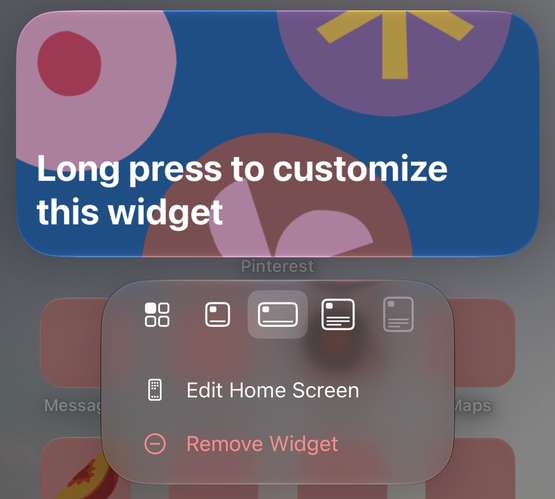
Image shows a screenshot of a homescreen with a widget. Options below widget when held are edit homescreen and delete widget.

so I'm not sure what to do.

0 replies

This post contains content from YouTube.

If you choose to view this content, YouTube may collect and process certain personal data. You can view YouTube’s <a href="https://www.youtube.com/t/privacy" target="_blank">privacy policy here<span class="a11y">(opens in new window)</span>.</a>

This post contains content from YouTube.

You have rejected content from YouTube. If you want to change your consent, press the button below.