

Lesson Activity & Materials Tutorial – How I Created It
Description
“My Amazing Weekend” is a Year 5 English writing activity that uses Freeform and Pages to guide pupils from brainstorming to a completed email. The activity makes pupils’ thinking visible and provides a clear process for planning, organising, writing and improving their work.
Subject: English
Level: Year 5
Theme: World of Self, Family and Friends
Topic: My Amazing Weekend
Task: Write an email to a friend describing what you did during the weekend.
Area of Focus: Writing – Email Writing
Cross-Curricular Elements
- Digital Literacy
- Creativity and Innovation
- Language
- Values and Collaboration
Learning Objectives
By the end of the lesson, pupils will be able to:
- Generate and organise at least four relevant ideas using Freeform.
- Write a friendly email in Pages with an appropriate greeting, opening, content and closing.
- Use suitable past-tense verbs and sequencing words to describe their weekend.
- Review and improve their writing using a simple checklist and peer feedback.
Step 1 – Engage
Objective: To activate prior knowledge and introduce the email-writing task.
I begin with the question:
“What did you do last weekend?”
Pupils share their experiences with a partner. I then show a simple model email and guide pupils to identify the greeting, opening, main content and closing.
Step 2- Plan in Freeform
Objective: To generate ideas and useful vocabulary before writing.
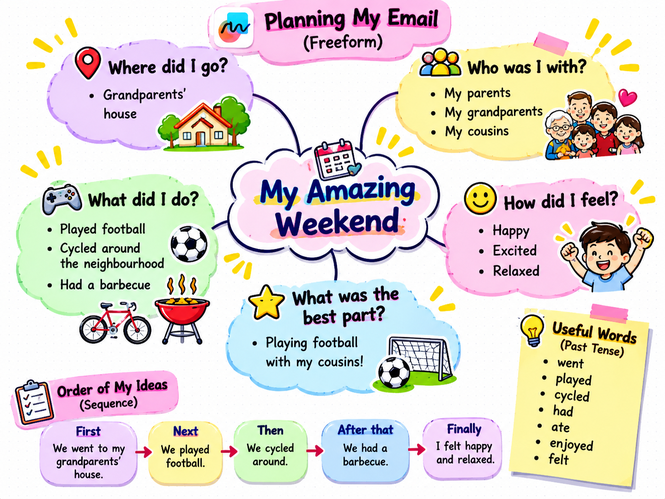
I create a Freeform planning board titled “My Amazing Weekend” with five prompts:
- Where did I go?
- Who was I with?
- What did I do?
- How did I feel?
- What was the best part?
Pupils duplicate or recreate the board and add keywords, short phrases, drawings, shapes and images based on their own weekend experiences.
Step 3 – Organise in Freeform
Objective: To sequence ideas before transforming them into sentences.
Pupils drag and rearrange their ideas into a logical order.
They can use sequencing words such as:
First → Next → Then → After that → Finally
This makes the organisation of their writing visible before they begin drafting.
Step 4 – Write in Pages
Objective: To transform visual ideas into structured writing.
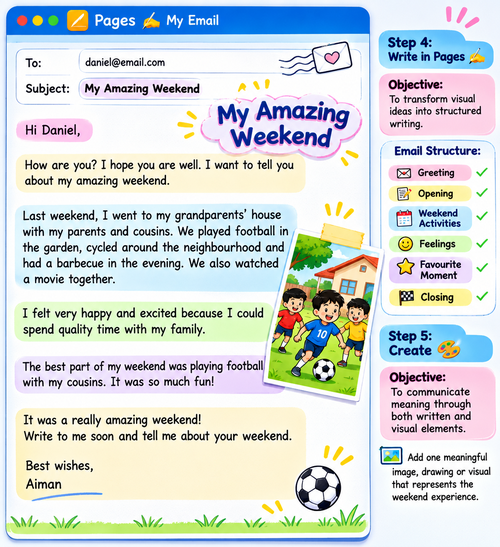
I provide pupils with a simple email template in Pages. Using their Freeform board as a reference, pupils develop their ideas into complete sentences and paragraphs.
They follow: Greeting → Opening → Weekend Activities → Feelings → Favourite Moment → Closing
Step 5 – Create
Objective: To communicate meaning through both written and visual elements.
Pupils add one meaningful image, drawing or visual representing their favourite weekend moment to their Pages document.
Step 6 – Reflect and Revise
Objective: To improve writing through self-assessment.
Pupils use a checklist:
✓ Did I include a greeting and closing?
✓ Did I describe what I did?
✓ Are my ideas in a clear sequence?
✓ Did I use past tense?
✓ Did I describe my feelings?
✓ Did I check spelling and punctuation?
Pupils then edit their email directly in Pages.
Step 7 – Share and Improve
Objective: To develop collaboration and reflection through peer feedback. Pupils share their email with a partner.
Their partner provides:
⭐ One thing I liked
💡 One suggestion for improvement
Pupils use the feedback to make one final improvement.
Closure
At the end of the activity, pupils compare their original Freeform board with their completed email in Pages and reflect on how their ideas developed.
The strength of this activity is not simply using two Apple apps. Freeform makes pupils’ thinking visible, while Pages helps them transform that thinking into purposeful writing.
This creates a scaffolded writing experience that can help pupils become more confident, creative, reflective and independent writers.
Educators can easily adapt the same workflow for diary entries, stories, descriptions, invitations and other writing tasks.






Attach up to 5 files which will be available for other members to download.