

🌈 Find, Highlight & Create: Learning Colours with Keynote
Who says learning colours has to be limited to flashcards and worksheets?
I designed this interactive English language activity using Apple Keynote on iPad to help primary school students learn colour vocabulary through word searches, creativity, and sentence construction.
🎯 Learning Objectives
By the end of the lesson, students will be able to:
- Identify and recognise common colour words in English.
- Locate colour vocabulary in a word search puzzle.
- Use digital highlighting tools to mark the hidden words.
- Create simple sentences to describe objects using colours.
- Express their understanding through visual representations.
📱 How Technology Enhances Learning
Using Keynote on iPad, students become active learners as they explore vocabulary and create their own visual examples.
✨ Learning Activities
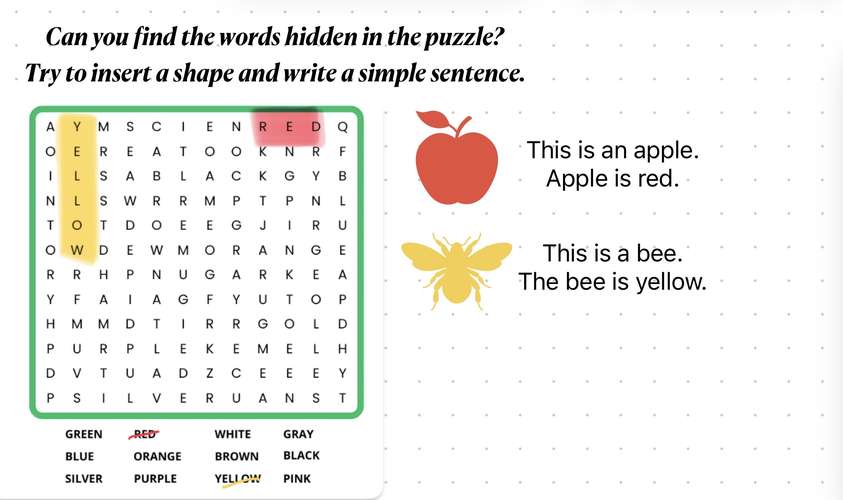
- Find It! 🔍 Students search for hidden colour words in the puzzle, such as red, yellow, blue, green, and orange.
- Highlight It! 🖍️Using the drawing tools in Keynote, students highlight the colour words they discover.
- Create It! 🎨 Students insert shapes or objects that represent the colours they have identified.
- Write It! ✏️Students construct simple sentences to describe their creations.
- Examples:
- This is an apple. The apple is red.
- This is a bee. The bee is yellow.
- First, Collaborate it in your class. Do the activity together with your classmates.
- Then, Share It! 🌟
- Students present their completed slides and practise reading their sentences aloud.
💡 Impact on Student Learning
This activity encourages students to move beyond memorising vocabulary by applying their learning through meaningful digital creation.
Students develop:
✅ English vocabulary recognition and spelling.
✅ Reading and simple sentence construction skills.
✅ Visual literacy and creativity.
✅ Digital skills using Keynote drawing and shape tools.
✅ Confidence in communicating their ideas.
✅ Independent learning and problem-solving skills.
🌟 Teaching Reflection
When students use Ipad to find, highlight, create, and explain, learning becomes more interactive and meaningful.
Keynote transforms a traditional word search worksheet into a creative learning experience where students can demonstrate their understanding in different ways.
It’s not just about finding words. It’s about turning words into meaningful creations!
Created by: Nur Farhana binti Mohd Kassim
Apple Distinguished Educator | SK Sungai Ara, Penang, Malaysia
#AppleEDU #AppleTeacher #Keynote #EveryoneCanCreate #EnglishLanguage #LearningWithiPad #CreativeLearning






Attach up to 5 files which will be available for other members to download.