

Pupils explore cohesive devices through animation, shared reading, and a collaborative Freeform mind map to improve their understanding of connected ideas in writing.
1. Lesson Overview
School Level: Malaysian Secondary School
Subject: English
Year / Form: Form 1
Topic / Unit: Writing Skills – Cohesive Devices in Email Writing
Curriculum Alignment:
Content Standard 4.1: Communicate intelligibly through print and digital media on familiar topics.
Learning Standard 4.1.5: Connect sentences into two coherent paragraphs or more using basic coordinating conjunctions and reference pronouns.
Supporting Learning Standards:
- 3.1.1 – Understand the main points in simple longer texts.
- 3.1.2 – Understand specific details and information in simple longer texts.
Duration: 60 minutes
Apple Technology: iPad
Apps Used: Freeform, Keynote, Camera and Photos
2. Learning Objectives
By the end of the lesson, pupils will be able to:
- Read and understand a short text based on an animation.
- Identify at least four cohesive devices used in the text.
- Classify cohesive devices according to their functions using a digital mind map in Freeform.
- Explain how cohesive devices help connect ideas and improve the flow of writing.
3. About the Learning Activity
This lesson introduces cohesive devices through an engaging animation and shared reading activity. Pupils first watch a short animation and read the accompanying text displayed on the screen. They take turns reading the text aloud to develop their reading fluency and comprehension.
In the second activity, pupils explore cohesive devices by identifying connecting words and phrases from the text. The teacher introduces simple notes explaining the functions of cohesive devices, including sequencing, addition, and reason.
Using Apple Freeform, pupils organise the cohesive devices into a visual mind map. The digital canvas allows pupils to use sticky notes, colours, shapes, and connecting lines to represent their understanding of how ideas are connected in writing.
4. Learning Activity
Activity 1: Watch, Read & Discover (20 Minutes)
Explore:
The teacher introduces the lesson by displaying a short animation related to a familiar topic, such as weekend activities.
Pupils watch the animation and observe the sequence of events. The teacher then displays the accompanying text based on the animation.
Teacher's Activities:
- The teacher plays a short animation using Keynote on the iPad.
- The teacher displays the text related to the animation.
- The teacher guides pupils to read the text and understand its main ideas.
- The teacher invites pupils to take turns reading the text aloud.
- The teacher asks simple comprehension questions about the events in the animation.
Pupils' Activities:
- Pupils watch the animation carefully.
- Pupils read the displayed text silently.
- Pupils take turns reading the text aloud.
- Pupils answer comprehension questions based on the text.
Apple Technology Integration:
Keynote is used to display the animation and accompanying text. The visual and audio elements help pupils understand the context before engaging in reading.
Activity 2: Discover & Connect – Cohesive Devices (30 Minutes)
Explore:
The teacher asks pupils to identify words or phrases in the text that connect ideas and sentences.
The teacher introduces cohesive devices and displays simple notes explaining their functions.
Examples include:
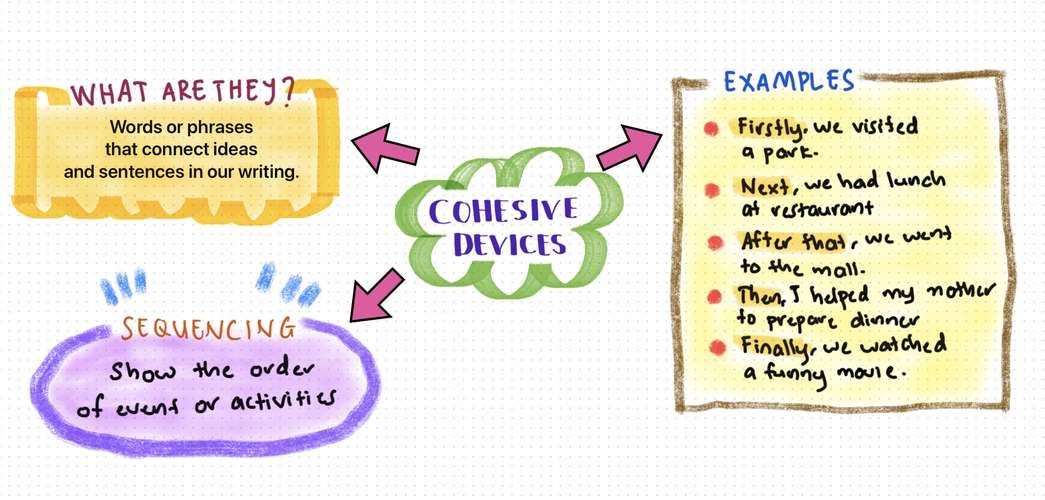
- Sequencing: Firstly, Next, After that, Then, Finally
- Addition: Besides, And, Also
- Reason: Because
Create:
Pupils use Apple Freeform to create a simple mind map titled "Cohesive Devices".
The mind map includes:
- The meaning of cohesive devices.
- Different types of cohesive devices.
- Examples taken from the animation text.
- The function of each cohesive device.
Pupils use different colours, sticky notes, shapes, and connecting lines to organise the information visually.
Teacher's Activities:
- The teacher guides pupils to identify cohesive devices from the text.
- The teacher explains the meaning and functions of cohesive devices using simple examples.
- The teacher demonstrates how to organise the information using Freeform.
- The teacher monitors pupils' work and provides guidance.
Pupils' Activities:
- Pupils identify and highlight cohesive devices in the text.
- Pupils classify the cohesive devices according to their functions.
- Pupils create a digital mind map using Freeform.
- Pupils add examples and explanations to their mind maps.
Apple Technology Integration:
Freeform provides a flexible digital canvas for pupils to organise language concepts visually. Pupils can rearrange ideas, add annotations, and connect information using shapes and lines.
Share & Reflect (10 Minutes)
The teacher invites selected pupils to present their Freeform mind maps.
Pupils explain the cohesive devices they identified and describe how these words connect ideas in the text.
The teacher concludes the lesson by reinforcing the importance of cohesive devices in producing clear and organised writing.
Pupils reflect on their learning by identifying one cohesive device they can use in their own email writing.
5. Learning Materials
- Short animation related to a familiar topic.
- Accompanying reading text based on the animation.
- Teacher-prepared notes on cohesive devices.
- iPad with Keynote and Freeform applications.
- Freeform mind map template.
- Screenshot of the completed Freeform mind map.
6. Learning Outcomes & Assessment
Expected Learning Outcomes:
By the end of the lesson, pupils will have:
- Demonstrated understanding of the animation and accompanying text.
- Identified cohesive devices used in the text.
- Classified cohesive devices according to their functions.
- Created a digital mind map using Freeform.
Assessment Approaches:
- Oral questioning during the reading activity.
- Observation of pupils' participation in shared reading.
- Identification of cohesive devices in the text.
- Assessment of the Freeform mind map based on accuracy, organisation, and understanding.
- Oral explanation during the sharing session.
7. Reflection & Adaptation
This activity integrates Apple technology into English language learning through animation, shared reading, and visual mind mapping.
The use of animation supports pupils' understanding of the text, while Freeform provides an interactive way to organise language knowledge.
For pupils who require additional support, the teacher can provide a partially completed mind map and a list of cohesive devices.
For more advanced pupils, the teacher can encourage them to use the cohesive devices to write a short email or paragraph about their own experiences.
The activity can also be adapted for other familiar topics, such as school activities, hobbies, family, and holidays.
Suggested Visuals:
- Cover image showing the lesson title.
- Screenshot of the animation displayed in Keynote.
- Screenshot of the accompanying reading text.
- Screenshot of pupils identifying cohesive devices.
- Completed Freeform mind map.
- Pupils' digital learning outputs.






Attach up to 5 files which will be available for other members to download.